Saturday, December 3, 2011

Thursday, November 17, 2011
Edge Loop Modeling
assignment: create a hand...details on Blackboard under
"Sub-D Modeling Hand"
Challenge beyond the lesson: Non/sub/super human hand
Saturday, November 12, 2011
Saturday, November 5, 2011
--------> Project Link: <-----
download original
extract
set project to AZTEC
you should have access to all props/features
import/merge them into your scene
rename materials if it asks you
feel free to add to your feature (all polygon limits are off--make it look pretty)
Saturday, October 29, 2011
Material Master
How to merge Material Master file into your scene:
1.) download AZTEC project zip file from this link: DOWNLOAD ME


2.) Unzip it somewhere on your computer

3.) Open your feature (or prop) in 3DS Max

4.) Set the Project to Aztec


1.) download AZTEC project zip file from this link: DOWNLOAD ME

2.) Unzip it somewhere on your computer

3.) Open your feature (or prop) in 3DS Max

4.) Set the Project to Aztec


4.) Merge in "MATERIAL MASTER merge me"

file/import/merge

select "MATERIAL MASTER merge me" as the file to merge

select "[Material Samples]" from the list

you should get this result
4.) Access Materials from the Material Editor by using the get material button

I circled the button to bring up the Material Map Browser...see how the material library is under Scene Materials now? You can double click them to load into material slots, or just drag them straight onto objects

voila!
Saturday, October 15, 2011
Group Environment Project
I.) Create your assigned material for the material bank:
Material must be able to be rendered with software renderer (i.e. no mental-ray-only materials)
Must contain at least 1 image as a texture.
Texture dimensions: 512pixels x 512 pixels .PNG format
II.) Create a prop for the prop bank:
Prop can be no more than 100 polygons.
Prop must be to scale. We are working in meters.
III.) Feature:
You will be assigned a major environmental feature.
Research your feature. Let's establish a common style for our environment.
Establish the scale of the feature. Create a bounding box that expresses this in meters (e.g. 10 meters wide, 20 meters long, 5 meters tall)
IV.) Organize Project
How can we distribute this project? How can we make it available for free to everyone at all times and avoid confusion?
Spreadsheet Link
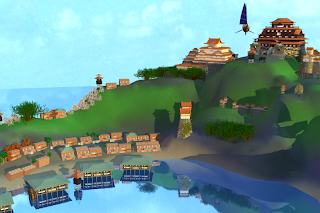
previous project examples:


I.) Create your assigned material for the material bank:
Material must be able to be rendered with software renderer (i.e. no mental-ray-only materials)
Must contain at least 1 image as a texture.
Texture dimensions: 512pixels x 512 pixels .PNG format
II.) Create a prop for the prop bank:
Prop can be no more than 100 polygons.
Prop must be to scale. We are working in meters.
III.) Feature:
You will be assigned a major environmental feature.
Research your feature. Let's establish a common style for our environment.
Establish the scale of the feature. Create a bounding box that expresses this in meters (e.g. 10 meters wide, 20 meters long, 5 meters tall)
IV.) Organize Project
How can we distribute this project? How can we make it available for free to everyone at all times and avoid confusion?
Spreadsheet Link
previous project examples:


Saturday, October 8, 2011
Editable Polygon
Assignment: Spaceship!
Create a spaceship using editable polygon.
Texture, light, render and post to blog with a write up of how you made it.
If you prefer, you may follow these intructions and build the Snowspeeder.
Create a spaceship using editable polygon.
Texture, light, render and post to blog with a write up of how you made it.
If you prefer, you may follow these intructions and build the Snowspeeder.
Friday, September 30, 2011
Lathe, Loft and Compound Objects
assignment part I
Lathe 3 Objects, add materials and light
Post (at least) 3 renders to your blog
Post (at least) 3 renders to your blog
Loft 3 Objects, add materials and lighting
post (at least) 3 renders to your blog
Be creative!
post (at least) 3 renders to your blog
Be creative!
assignment part II
Compete Boolean "Chest" assignment on Blackboard ?
OR:
Utilize 3 of the following to produce (at least) 3 different renders
ProBoolean
Terrain
ShapeMerge
BlobMesh
ProCutter
Connect
Conform
Scatter
Your assignment (both options) must be textured and lit!
Next week we begin editable polygons! Research Editable Polygons, Editable Mesh and Box Modeling...post to the 3DR&D Facebook Page
Your assignment (both options) must be textured and lit!
Next week we begin editable polygons! Research Editable Polygons, Editable Mesh and Box Modeling...post to the 3DR&D Facebook Page
Saturday, September 24, 2011
Lighting and Rendering
assignment:
Light your ammo room (worksheet from Blackboard)
post (at least) 3 renders to your blog
Friday, September 16, 2011
Materials and Surfacing
Assignment:
Working with the Material’s Editor, add surfaces to the provided
Friday, September 9, 2011
2D Shapes : LOGO
Assignment: LOGO
Design an appealing logo with shapes
Must include a Text element
Extrude and/or Bevel logo
Render and Save to your Blog for review next time
research topic for next week: materials, textures, surfaces in 3D Studio Max
post 1 unique link to our Facebook Page:
3DR&D
research topic for next week: materials, textures, surfaces in 3D Studio Max
post 1 unique link to our Facebook Page:
3DR&D
Thursday, September 1, 2011
Intro to MAX
Build a robot in 3D Studio MAX using primitives and basic transforms
create a new blog post:
tell me about your process, include any concept art and, of course...
post (at least) 3 renders of your robot:
different angles...show it off!
Research: post a UNIQUE link to 3DR&D on the topic of:
Research: post a UNIQUE link to 3DR&D on the topic of:
Splines, Lines, and Paths in 3DS Max
3D Studio Max - Keyboard Shortcuts
q | = select | ^z | = undo |
w | = move | ^y | = redo |
e | = rotate | ||
r | = scale | shift z | = undo viewport |
h | shift y | = redo viewport | |
^p | = pan | ||
^r | = orbit view | F3 | = shaded / wireframe toggle |
alt z | = zoom | ||
^w | = zoom region | ||
z | = zoom extents | ||
i | = center view on mouse | ||
^p | = pan | = toggle transform gizmo | |
space | = lock selection |
Thursday, August 25, 2011
Wednesday, August 25, 2010
Introductions
Hello. I am Ben Bays. My friends call me Beans. Here is a picture of my lovely wife, Tiffany, and myself in Bodrum, Turkey. Beer in foreground, castle in background. A well composed moment.

I have been making cartoons and video games professionally for about 15 years now. Take a look at my resume if you are interested.
I love to draw and build models in 3D packages like Maya, Max, and Mudbox. Environments are my passion. When I watch a cartoon, I am usually looking past the characters into the world. When I play a video game, I usually go very slowly and check out every little detail the artists have paced in the world. I am fascinated by world building, which has led me to build a career out of making environments for video games and backgrounds for cartoons.
I have had the opportunity to work on console games and Gameboy DS games, which was a great joy to me. Here is a sample of some games I have recently worked on:
On my own time, I am working on a project which involves taking hand drawn images and moving them into 3D space. I love to celebrate the texture of paper, pen and pencil into the context of motion and 3D space:
Asteroids from Ben Bays on Vimeo.
I have a lot of influences: Miyazaki, Moebiius, Bilal, Herge, Uderzo, Syd Mead, even some guys I have met along the way, like David Levy, Thierry Diozon, Jason Manley, Manny Carrasco. I love French comics and a lot of Anime. Although most Anime is garbage, some of it is really stellar. I love cheesy science fiction book covers from any era and old 1970's space station art. I love special effects in movies and can forgive just about anything in a flick if there are cool explosions and matte paintings.
I have a job. A few jobs actually. I teach motion Graphics and Visual Effects at the University of Texas, I teach 3D Modeling and rendering at ACC and I am the In-World Composite Director for Videoranch. I have had my share of cool jobs, and every job goes away at some point, only to be replaced with something better. These are the three best jobs I have ever had in my entire life. I also do contract work just about every chance I get. When you do something like making games, or visual effects, or motion graphics, jobs just seem like extra fun.
If you are interested in me, in my work, 3D modeling, Motion Graphics, After Effects, or Photoshop, you should take a look around this blog. There are links all along the right side that should take you to cool places. If you just want to peruse my work without a bunch of text, you can check out my portfolio. As always, I welcome any and all feedback.
I also own a 3D Tutoring business. If you are interested in learning to model, texture, light and render in 3D Studio Max or Maya, you should contact me at
3D Tutoring
Friday, July 16, 2010
Concept Art and Reference
Schematic/Blueprint


http://commons.wikimedia.org/wiki/Category:Historical_technical_drawings
Great list of schematics and technical drawings. Moves historically, which is interesting.
http://commons.wikimedia.org/wiki/Category:Technical_drawings_by_theme
Same categories, but sorted by theme.
http://commons.wikimedia.org/wiki/Category:Architectural_drawings
Focus on floor plans, architectural elements.
http://commons.wikimedia.org/wiki/Category:Drawings_by_theme
A very general list of drawings.
http://www.the-blueprints.com/blueprints/
hmm...whatever could THIS site be about?
Character Reference/Model Sheets


http://www.catsuka.com/gengal.php
Great site with model and concept sheets from many animated features and series.
http://animationarchive.net/Model%20Sheets/index.php
Disnet Model sheets...links are little wonky, but most of the stuff is there
http://www.drawingboard.org/viewforum.php?f=11
Model sheets...forum based, but good stuff!
Inspiration:



http://www.allworldwars.com/Soviet%20War%20Paintings.html
Soviet War Paintings
http://www.sonofthesouth.net/
Civil War prints, scanned from Harper's Weekly
http://www.heiszwolf.com/subs/plans/plans.html
Submarine Plans
http://www.phys.uu.nl/~vgent/doppelmayr/doppelmayr.htm
Excellent Astronomical Plates
Star Wars ships...overdone, but fun anyway
Disney backgrounds
Spaceships rule
Robots are awesome
Modern Ruins
Mammal Skulls
Tools:
http://www.dmoz.org/Computers/Software/Graphics/
Thursday, February 18, 2010
Schedule
► Week1: Introductions
○ Lecture: Introduction to course – Instructor; Syllabus; Equipment; Supplies; Textbooks; and Modeling Principles
○ Lecture: Introduction to 3D space; 3D Coordinate Systems
○ In-class work: -Orientation to 3D
research topic: 3D Studio Max
► Week 2 MAX Orientation, Navigation, Primitives
Orthographic Worksheet Due
○ Lecture: Navigation Selection
○ Lecture: Creating, Transforming & Modifying Primitives
○ In-class work: -Primitives
ASSIGNMENT: BUILD YOUR ROBOT
research topic: splines and shapes
► Week 3 : 2D Shapes, 3D Forms
robot due
QUIZ 1: Orientation and Navigation
○ Lecture: 2D Shapes/ Text/ Extrude/ Bevel
○ In-class work: -Extrude & Bevel a 2D Shape (Logo)
○ ASSIGNMENT:-EXTRUDE & BEVEL A 2D SHAPE (LOGO)
research topic: materials, textures, surfaces in 3D Studio Max
► Week 4 ○ Surfacing
QUIZ 2: Primitives and 2D Shapes
Logo Due
○ Lecture: Basic Surfacing
○ In-class work: -Basic Surfacing (Ammo Room)
○ ASSIGNMENT: -BASIC SURFACING (AMMO ROOM)
research topic: lighting in 3D Studio Max
► Week 5 Lighting
Ammo Room Due
○ Lecture: Practical Light & Color; Basic Lighting Tools
○ Lecture: Basic Cameras and rendering
○ ASSIGNMENT: -BASIC LIGHTING AND RENDERING (AMMO ROOM)
research topic:Lathe and Loft
► Week 6 Lathe, Loft, Boolean and compound objects
Ammo Room with Lighting due
QUIZ 3: Surfacing and Lighting
○ Lecture: Sweeping 2D Shapes - Lathe and Loft
○ Lecture: Boolean and Compound Objects
○ ASSIGNMENT: -LATHE AND LOFT
○ ASSIGNMENT: -BOOLEAN and COMPOUND OBJECT
research topic:Editable Polygon -- mechanical, architectural, hard surface modeling
► Week 7 Editable Polygon
QUIZ 4: Lathe and Loft
QUIZ 5: Boolean
MIDTERM EXAM
Lathe, Loft and Boolean Due
○ Lecture: Editable Polygon
○ ASSIGNMENT: -Spaceship/Snowspeeder
► Week 8 Preproduction
○ material bank
○ prop bank
○ Lecture: Hard Surface Modeling w/ Editable Poly
○ ASSIGNMENT: - Hard Surface Modeling w/ Editable Poly
► Week 9
Feature model Due
critique and revise models
► Week 10
Feature texture due
critique and revise surfaces
► Week 11
assemble, light and render midterm
► Week 12
Midterm Renders Due
Midterm Post-Mortem
research topic: Edge Loop modeling, rigging, skinning, character modeling
○ Lecture: -Organic Modeling w/ Edit Poly and Sub-D (Hand)
○ ASSIGNMENT: -ORGANIC MODELING W/ EDIT POLY &; SUB-D (Hand)
research topic: Z-Brush
► Week 14
Organic Model Due
○ Lecture: Z-Brush
QUIZ 6: Subdivision modeling
► Week 15
FINAL EXAM/PROJECT
party
○ Lecture: Introduction to course – Instructor; Syllabus; Equipment; Supplies; Textbooks; and Modeling Principles
○ Lecture: Introduction to 3D space; 3D Coordinate Systems
○ In-class work: -Orientation to 3D
research topic: 3D Studio Max
► Week 2 MAX Orientation, Navigation, Primitives
Orthographic Worksheet Due
○ Lecture: Navigation Selection
○ Lecture: Creating, Transforming & Modifying Primitives
○ In-class work: -Primitives
ASSIGNMENT: BUILD YOUR ROBOT
research topic: splines and shapes
► Week 3 : 2D Shapes, 3D Forms
robot due
QUIZ 1: Orientation and Navigation
○ Lecture: 2D Shapes/ Text/ Extrude/ Bevel
○ In-class work: -Extrude & Bevel a 2D Shape (Logo)
○ ASSIGNMENT:-EXTRUDE & BEVEL A 2D SHAPE (LOGO)
research topic: materials, textures, surfaces in 3D Studio Max
► Week 4 ○ Surfacing
QUIZ 2: Primitives and 2D Shapes
Logo Due
○ Lecture: Basic Surfacing
○ In-class work: -Basic Surfacing (Ammo Room)
○ ASSIGNMENT: -BASIC SURFACING (AMMO ROOM)
research topic: lighting in 3D Studio Max
► Week 5 Lighting
Ammo Room Due
○ Lecture: Practical Light & Color; Basic Lighting Tools
○ Lecture: Basic Cameras and rendering
○ ASSIGNMENT: -BASIC LIGHTING AND RENDERING (AMMO ROOM)
research topic:Lathe and Loft
► Week 6 Lathe, Loft, Boolean and compound objects
Ammo Room with Lighting due
QUIZ 3: Surfacing and Lighting
○ Lecture: Sweeping 2D Shapes - Lathe and Loft
○ Lecture: Boolean and Compound Objects
○ ASSIGNMENT: -LATHE AND LOFT
○ ASSIGNMENT: -BOOLEAN and COMPOUND OBJECT
research topic:Editable Polygon -- mechanical, architectural, hard surface modeling
► Week 7 Editable Polygon
QUIZ 4: Lathe and Loft
QUIZ 5: Boolean
MIDTERM EXAM
Lathe, Loft and Boolean Due
○ Lecture: Editable Polygon
○ ASSIGNMENT: -Spaceship/Snowspeeder
---------------------- Midterm Project : ------------------
► Week 8 Preproduction
○ material bank
○ prop bank
○ Lecture: Hard Surface Modeling w/ Editable Poly
○ ASSIGNMENT: - Hard Surface Modeling w/ Editable Poly
► Week 9
Feature model Due
critique and revise models
► Week 10
Feature texture due
critique and revise surfaces
► Week 11
assemble, light and render midterm
► Week 12
Midterm Renders Due
Midterm Post-Mortem
research topic: Edge Loop modeling, rigging, skinning, character modeling
---------------------------------------
► Week 13○ Lecture: -Organic Modeling w/ Edit Poly and Sub-D (Hand)
○ ASSIGNMENT: -ORGANIC MODELING W/ EDIT POLY &; SUB-D (Hand)
research topic: Z-Brush
► Week 14 Holiday
► Week 14
Organic Model Due
○ Lecture: Z-Brush
QUIZ 6: Subdivision modeling
► Week 15
FINAL EXAM/PROJECT
party
Subscribe to:
Posts (Atom)